


If your Lodar remote stopped working after a battery swap, you got a new transmitter, or you're setting up a system for the first time — you need to pair the transmitter to the receiver. It's a quick process, but if you don't know the sequence it can feel like you're guessing.
This guide covers pairing for two of the most common Lodar models we carry at PIERCE: the 11 Series Mini and the 9 Series. Both take about one to two minutes once you know what you're doing.
Before You Start
A few things to confirm before you begin:
- The receiver has a power source connected (but note it will need to be off when you start the process)
- You have fresh batteries in the transmitter
- You're within reasonable range of the receiver (within 10 feet during pairing is ideal)
- You know which model you have — check the label on the transmitter or receiver if you're not sure
If your transmitter and receiver are different model series, they won't pair. Lodar transmitters are series-specific.
Pairing the Lodar 11 Series Mini Transmitter
The 11 Series Mini is a compact transmitter commonly used on winches, hoists, and lighter-duty hydraulic applications.
Watch the full pairing video here:
Step-by-step:
- Power off the receiver and ensure that no lights are on.
- Remove the back cover on the remote and install batteries. The light will illuminate, indicating power. Press the red button to power it back off.
- Press and hold the red and green buttons until the indicator light goes out, and then begins blinking.
- Power on the receiver. The light will illuminate and begin flashing to indicate that programming mode has begun.
- Press and hold the green button on the remote until light on the receiver goes solid.
- Press and hold the green button one last time and you will see "SET" light on the receiver. Next, press F1 and F2, and the transmitter and receiver will be synced.
Pairing the Lodar 9 Series Transmitter
The 9 Series is a larger, multi-channel transmitter used for applications requiring more control functions — dump beds, larger winches, or custom multi-function setups.
Watch the full pairing video here:
Step-by-step:
- Power off the receiver and ensure that no lights are on.
- Remove the battery door off of the remote and install batteries. Reinstall the battery door, and then press the red button to ensure that remote is off.
- Power up the receiver. The power light will be on, and the flashing light indicates that the 20 second window for programming the transmitter has begun.
- On the remote, press and hold the green button and first F1 button beneath the red button at the same time.
- Hold until the receiver light stops blinking — pairing complete
- Press green button one last time.
Receiver Keeps Shutting Off After Pairing?
This is one of the most common calls we get — and it's almost never a pairing problem. If your Lodar receiver paired correctly but keeps cutting out, the culprit is almost always voltage.
Here's where to look, in order:
1. Check your battery Check the charge level.
2. Check for a bad ground A poor ground connection is the most common wiring culprit. Check every ground connection in the circuit — the receiver ground, the solenoid ground, and the chassis ground if applicable. Look for loose terminals, or corrosion.
3. Check for loose connections or corrosion Go through every connection in the circuit. A loose or corroded ring terminal creates resistance, which drops voltage under load. Clean corroded connections with electrical contact cleaner and reseat anything that isn't fully seated.
How long should battery life last?
The battery life with normal operation lasts between 4 – 6 months. The Mini Transmitter battery lasts between 3 – 4 again based on operation. The LED in the Keypad will flash rapidly when it's time for a change.
Still Not Working?
Give us a call at 940.538.5643 or email sales@piercesales.com. We've set up enough Lodar systems to know where the tricky spots are, and we'd rather spend five minutes on the phone with you than have you chase a problem for two hours.
Watch: How to Test a PIERCE Winch Motor
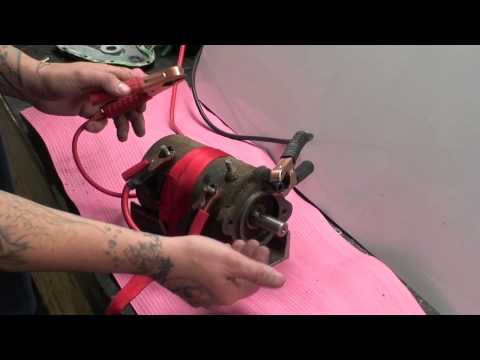
This is a test on a PS534H and PS534HD motors to PS654 PIERCE winches. This video will also show signs of a faulty motor.